JDBC (Java Database Connectivity)
- 자바를 이용한 데이터베이스의 접속과 SQL문장의 실행, 그리고 실행 결과로 얻어진 데이터의 핸들링을 제공하는 방법과 절차에 관한 규약
- 자바 프로그램 내에서 SQL문을 실행하기 위한 자바 API
- JAVA는 표준 인터페이스인 JDBC API를 제공한다.
- 데이터베이스 벤더, 또는 기타 써드파티에서는 JDBC 인터페이스를 구현한 드라이버(driver)를 제공한다.
환경 구성
- JDK설치
- JDBC 드라이버 설치
Maven에 의존성을 추가한다.
| <dependency> <groupId>mysql</groupId> <artifactId>mysql-connector-java</artifactId> <version>5.1.45</version> </dependency> |
* DataBase 작업 절차
클라이언트와 데이터베이스를 연결한다.
쿼리문을 작성한 다음 실행한다.
DB에서 결과값을 가져온다.
JDBC 클래스의 생성 관계
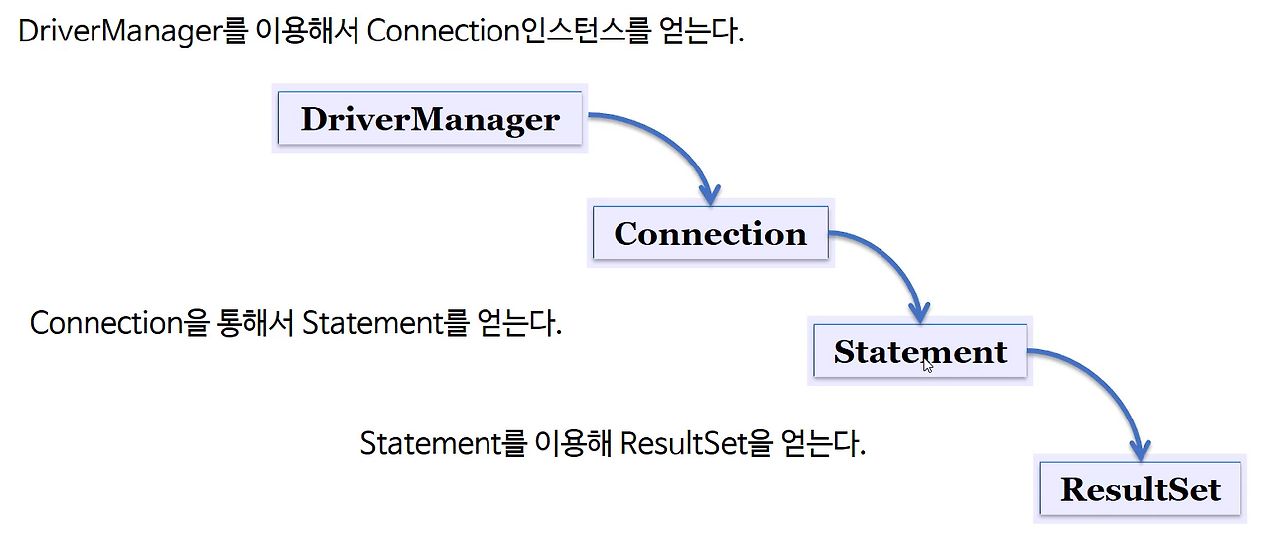
JDBC 사용
- JDBC 를 이용한 프로그래밍 방법
1단계 : import
import java.sql.*;
2단계 : 드라이버를 로드한다.
Class.forName("com.mysql.jdbc.Driver");
3단계 : Connection 객체를 생성한다. (접속)
String dburl = "jdbc:mysql://localhost/dbName";
Connection conn = DriverManager.getConnection(dburl, ID, PWD);
4단계 : Statement 객체를 생성 및 질의 수행
Statement stmt = con.createStatement();
* 참고
stmt.execute("query");
stmt.executeQuery("query");
stmt.executeUpdate("query");
5단계 : SQL문에 결과물이 있다면 ResultSet 객체를 생성한다.
ResultSet rs = stmt.executeQuery("select no from user");
6단계 : 모든 객체를 닫는다. ( 가장 마지막에 열린 ResultSet를 먼저 닫아주고 순차적으로 닫아준다.)
rs.close();
stmt.close();
con.close();
소스 코드
| public static Connection getConnection() throws Exception{ String url = "jdbc:oracle:thin:@117.16.46.111:1521:xe"; String user = "smu"; String password = "smu"; Connection conn = null; Class.forName("oracle.jdbc.driver.OracleDriver"); conn = DriverManager.getConnection(url, user, password); return conn; } |
| public List(GuestBookVO) getGuestBookList(){ List<GuestBookVO> list = new ArrayList<>(); GuestBookVO vo = null; Connection conn = null; PreparedStatement ps = null; ResultSet rs = null; try { conn = DBUtil.getConnection(); String sql = "select * from guestbook"; ps = conn.prepareStatement(sql); rs = ps.executeQuery(); while(rs.next()){ vo = new GuestBookVO(); vo.setNo(rs.getInt(1)); vo.setId(rs.getString(2)); vo.setTitle(rs.getString(3)); vo.setContent(rs.getString(4)); vo.setRegDate(rs.getString(5)); list.add(vo); } } catch(Exception e) { e.printStackTrace(); } finally { DBUtil.close(conn, ps, rs); } return list; } |
| public int addGuestBook (GuestBookVO vo) { int result = 0; Connection conn = null; PreparedStatement ps = null; try { conn = DBUtil.getConnection(); String sql = "insert into guestbook values(" + "guestbook_seq.nextval,?,?,?,sysdate)"; ps = conn.prepareStatement(sql); ps.setString(1, vo.getId()); ps.setString(2, vo.getTitle()); ps.setString(3, vo.getContent()); result = ps.executeUpdate(); } } catch(Exception e) { e.printStackTrace(); } finally { DBUtil.close(conn, ps); } return result; } |
| public static void close (Connection conn, PreparedStatement ps) { if (ps != null) { try { ps.close(); } catch (SQLException e) {e.printStackTrace();} } if (conn != null) { try { conn.close(); } catch (SQLException e) {e.printStackTrace();} } } |
참고 : boostcourse https://www.boostcourse.org/web316/lecture/16734?isDesc=false
웹 프로그래밍(풀스택)
부스트코스 무료 강의
www.boostcourse.org
'boostcource > boostcourse_web programming' 카테고리의 다른 글
| JDBC -2 (0) | 2024.04.25 |
|---|---|
| JDBC -1 (0) | 2024.04.24 |
| Maven 실습 (0) | 2024.04.22 |
| Maven (0) | 2024.04.22 |
| 데이터베이스 (0) | 2024.04.21 |


